
| New | Save | Copy | Toggle | Inc Font | Dec Font |
| ` | 1 | 2 | 3 | 4 | 5 | 6 | 7 | 8 | 9 | 0 | - | = | ← Back |
| Tab ↹ | q | w | e | r | t | y | u | i | o | p | [ | ] | \ |
| Caps | a | s | d | f | g | h | j | k | l | ; | ' | ↩ Enter |
| ⇧ Shift | z | x | c | v | b | n | m | , | . | / | ⇧ Shift |
| Ctrl | ❖ | Alt | Space | Alt | ❖ | ⌸ | Ctrl |
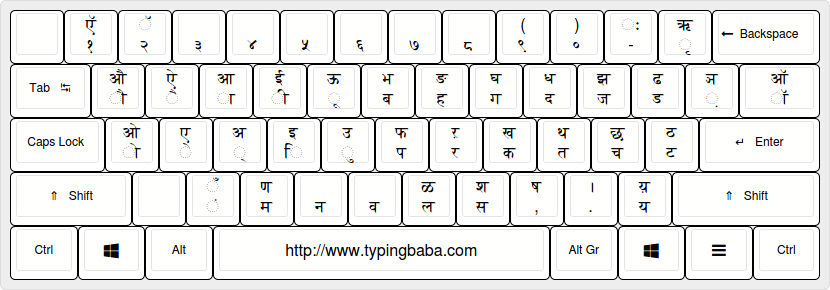
Here we present quite a basic yet valuable, handy yet effective tool for everyone from office employees to students everyone will be satisfied with this fast Online Marathi Keyboard tool. Marathi uses a Devanagari script similar to the Hindi Keyboard but except for special characters different in the Marathi Keyboard. Marathi is spoken mainly in the Maharashtra state of modern India. The Origins of the Devanagari script can be found in Brahmi Script but Devanagari is more refined and symmetrical. The Inscript keyboard is a standard Indian keyboard designed for Indian languages and is based on Unicode font.
This online Marathi keyboard is very simple to use and it has seven functions in it. These functions are designed to make your work painless and convenient. These shortcuts are important for fast work and seamless experience. These functions are explained below:-
New: When you click on this shortcut a pop-up will show asking "All data will be Lost" and if you select ok your typed content will be erased replacing the new blank window.
Save:M The second icon on the Marathi Keyboard Tool is the save button. After completing your work you can click on this icon which will download your work in .doc format.
Copy: The third icon on the keyboard tool is the Copy button if you click on this tool your content will be copied to the clipboard which you can paste anywhere by using the shortcut Ctrl+v or simply right-click on the mouse and click paste.
Print: The next icon on the Online Marathi Keyboard is the print function. You can Print directly from this tool.
Toggle: The fifth shortcut on the tool is the Toggle button. This icon is exclusive to this tool and very useful too. This icon if clicked will change the keyboard layout from Marathi to English so that you can write content in English too.
Increase Font(+): This Icon lets you increase the font size of your text.
Decrease Font(-): This Icon lets you decrease the font size of your text.
There are two types of Marathi Keyboards depending on amateur and expert level. Serious and regular users use the Inscript Keyboard and non-frequent users use phonetic Keyboard.
The Inscript keyboard is the authorised layout for Marathi and other Devanagari-based languages. While it requires some practice to master, it’s highly efficient once you’re habituated to the layout. The keys are mapped to correspond directly with the Devanagari script characters. For example: अ (अ) is typed using the "A" key. क (क) is typed using the "K" key. न (न) is typed using the "N" key. Combining keys like Shift and specific letters can produce complex characters and symbols, such as ज्ञ (ज्ञ).
Phonetic keyboards allow you to type Marathi words using the Roman alphabet, which are then transliterated into the Devanagari script. For instance: Typing "namaskar" converts to नमस्कार. This keyboard is intuitive and ideal for beginners transitioning to Marathi typing.
Online tools like Google Input Tools or https://www.typingbaba.com/translator/english-to-marathi-translation.php provide virtual Marathi keyboards that don’t require installation. Simply type in Roman letters, and the software converts them to Devanagari script.